
If you own an AquaTru Carafe Countertop Water Purifier, you may have a problem where the change filter light won’t turn off after changing one or more filters and resetting the unit.
I have three AquaTru Carafe Filters and have experienced this problem with all three filters.
These are the official instructions from AquaTru: how to change a filter on the AquaTru Carafe Countertop Water Purifier (video explanation below). Note: this did not work for me. Since the solution was not readily available online at the time, here it is.
When The Change Filter Light Won’t Turn Off
If the reset filter light won’t turn off after following the official instructions above, here is the solution that worked for me:
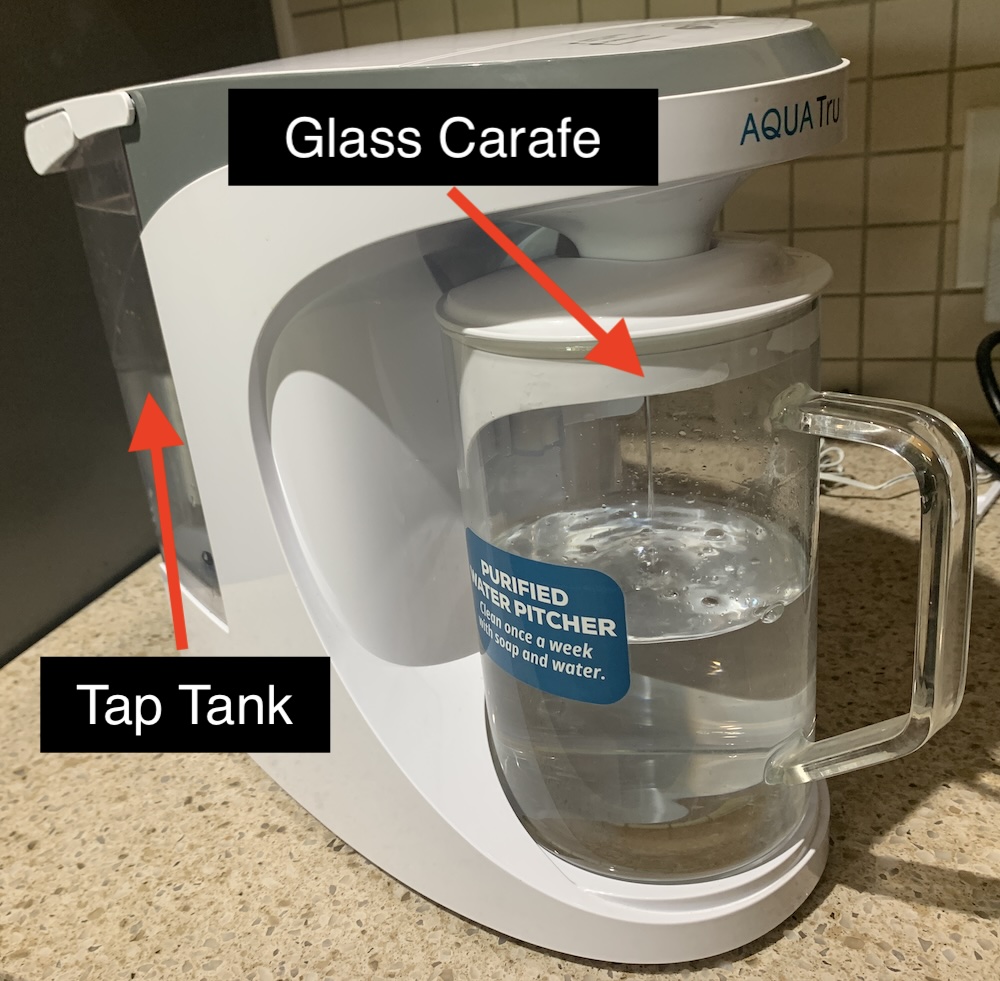
- Fill the Tap Tank (tank in the back)
- Make sure the Glass Carafe (water jug in the front) is in place in the filter
- Let the water filter for about 5 seconds
- Remove the Glass Carafe
- Press and hold the RESET button for 5 seconds
All filter lights should turn off.
AquaTru technical support recommended this solution to me and it worked every time.
Review of the AquaTru Carafe Countertop Water Purifier
If you are in the market for a water purifier, here is a Reddit discussion about the AquaTru Carafe Countertop Water Purifier. I prefer Reddit product reviews over blog post reviews. With blog post reviews vying for affiliate link revenue, you can never tell if the reviewer is being honest or trying to make a buck.
For information on what substances are removed, I have included the Aquatru Performance Data Sheet.
Overall, I am happy with this filter. The water out of my tap has an odd taste and unpleasant smell. After running it through the AquaTru filter, the water tastes good and has no odor.
Enjoy your clean water 😋